Category: Office Equipment

  • Digital Efficiency: The 10 Essential Productivity SaaS Tools for 2026

    Digital Efficiency: The 10 Essential Productivity SaaS Tools for 2026

    In 2026, the gap between “busy” and “productive” is defined by your software stack. As we’ve discussed in our Ultimate Smart Home Office Guide, having a great desk and chair is the foundation, but your digital tools are what actually execute the work.

    The theme for SaaS in 2026 is “Agentic Workflows.” We are moving away from tools where you manually enter data and toward AI-integrated platforms that predict your needs, summarize your meetings, and automate your repetitive tasks.

    Best productivity SaaS tools for remote teams 2026

    At Pick Out Right, we’ve curated the 10 most impactful SaaS tools that every remote professional, entrepreneur, and small team should be using this year.


    1. The All-in-One Workspace: Flexible AI-Powered Knowledge Base

    If you are still switching between five different apps for notes, tasks, and wikis, you are losing “context-switching” time.

    Why it’s essential: In 2026, the top-tier workspace tools allow you to chat with your own data. You can ask, “What were the action items from last Tuesday’s client call?” and the AI will pull the answer directly from your integrated notes and databases.

    • Best For: Solopreneurs and creative teams.
    • Key Feature: Centralized “Wiki” that updates itself based on your project progress.

    2. The Meeting Genius: AI Meeting Assistant & Note Taker

    Spending an hour in a meeting followed by 30 minutes writing a recap is a 2025 habit. In 2026, your AI assistant handles the documentation.

    Why it’s essential: This tool joins your Zoom or Teams calls, transcribes the conversation in real-time, and generates a bulleted summary of action items within seconds of the call ending.

    • Best For: Sales teams and project managers.
    • Key Feature: Searchable video library—find every time a specific keyword was mentioned across months of meetings.

    3. The Visual Project Hub: Intuitive Visual Work OS

    For small teams, spreadsheets are where projects go to die. You need a “Work OS” that visualizes timelines.

    Why it’s essential: The 2026 standard for project management is automation. When a designer finishes a task, the system should automatically notify the copywriter and move the deadline for the next phase without you lifting a finger.

    • Best For: Marketing agencies and small startups.
    • Key Feature: Drag-and-drop Kanban boards with built-in “No-Code” automation.

    4. The Automation Glue: No-Code Workflow Integrator

    This is the “secret sauce” of high-level productivity. It connects your various SaaS tools so they talk to each other.

    Why it’s essential: Imagine if every time you received a new lead in your email, a task was created in your project hub, a folder was made in your cloud storage, and a “Welcome” message was drafted in your AI writer. That is the power of a workflow integrator.

    • Best For: Tech-savvy entrepreneurs.
    • Key Feature: 8,000+ app integrations to build “Zaps” or workflows.

    5. The Research Engine: AI-Powered Search & Citation Tool

    Traditional search engines often lead to a “scroll-and-click” nightmare. The new standard is an AI search engine that reads the web for you.

    Why it’s essential: It doesn’t just give you links; it gives you a comprehensive answer with numbered citations to the sources. For professionals who need reliable data fast, this is a game-changer.

    • Best For: Writers, researchers, and SEO specialists.
    • Key Feature: “Deep Research” mode that consults dozens of sources to write a full report for you.

    6. The Calendar Architect: AI Smart Scheduling & Time-Blocker

    Manual calendar blocking is dead. You need a tool that defends your “Deep Work” time.

    Why it’s essential: This tool looks at your to-do list and your calendar, then automatically finds the best time for you to work on specific tasks. If a new meeting is booked, it reshuffles your entire day to ensure your deadlines are still met.

    • Best For: Anyone struggling with “Meeting Overload.”
    • Key Feature: Automatic “Focus Time” protection.

    7. The Visual Creator: Magic AI Design Suite

    Content is king, but you shouldn’t need a degree in Graphic Design to create a professional social media post.

    Why it’s essential: Modern design SaaS tools use “Magic Studio” features to turn a text prompt into a full presentation, social graphic, or even a short video.

    • Best For: Social media managers and affiliate marketers.
    • Key Feature: Background remover and AI-powered “Magic Expand” for photos.

    8. The Writing Partner: AI Tone & Grammar Assistant

    In a remote world, your writing is your identity. Whether it’s an email or a blog post, it needs to be polished.

    Why it’s essential: Beyond just fixing typos, the 2026 version of this tool helps you rewrite entire paragraphs to be more “humanized,” persuasive, or professional depending on your audience.

    • Best For: Everyone.
    • Key Feature: Real-time tone detection (Ensure you don’t sound too aggressive in that Slack message!).

    9. The Digital Brain: Privacy-First Cloud Storage & File Hub

    Files should be accessible, secure, and searchable.

    Why it’s essential: In 2026, cloud storage isn’t just a “box of files.” It’s an intelligent hub that suggests files you might need based on your upcoming calendar events.

    • Best For: Managing large-scale affiliate assets.
    • Key Feature: High-speed syncing and zero-knowledge encryption for security.

    10. The App Builder: Natural Language Web App Engine

    Need a custom internal tool for your business? You no longer need to hire a developer.

    Why it’s essential: This revolutionary platform allows you to describe the app you want to build in plain English, and it generates the full-stack code, database, and UI for you. It’s how modern entrepreneurs are building custom calculators, trackers, and portals.

    • Best For: Scaling businesses and app developers.
    • Key Feature: Text-to-App generation.

    Summary Stack for 2026

    CategoryRecommended Tool TypeBenefit
    WorkspaceAI-Integrated WikiNo more lost notes.
    MeetingsAutomated Notetaker100% focus on the conversation.
    AutomationNo-Code IntegratorReclaims hours of manual data entry.
    SchedulingAI Time-BlockerProtects your high-value hours.

    Final Thoughts: Don’t Overcomplicate Your Stack

    The goal of SaaS is to simplify your life, not add more “digital noise.” Start by identifying your biggest “time-leak”—is it meetings? Is it manual data entry? Pick one tool to solve that problem first, then build your stack around it.

    A high-performance digital stack, paired with a physical Ergonomic Office Chair and a Small-Space Standing Desk, is the ultimate formula for success in 2026.


    Affiliate Disclosure

    Pick Out Right reviews the best in tech and software. Some links on this page are affiliate links, meaning we may earn a commission if you sign up for a service. This helps us keep our research independent and free.
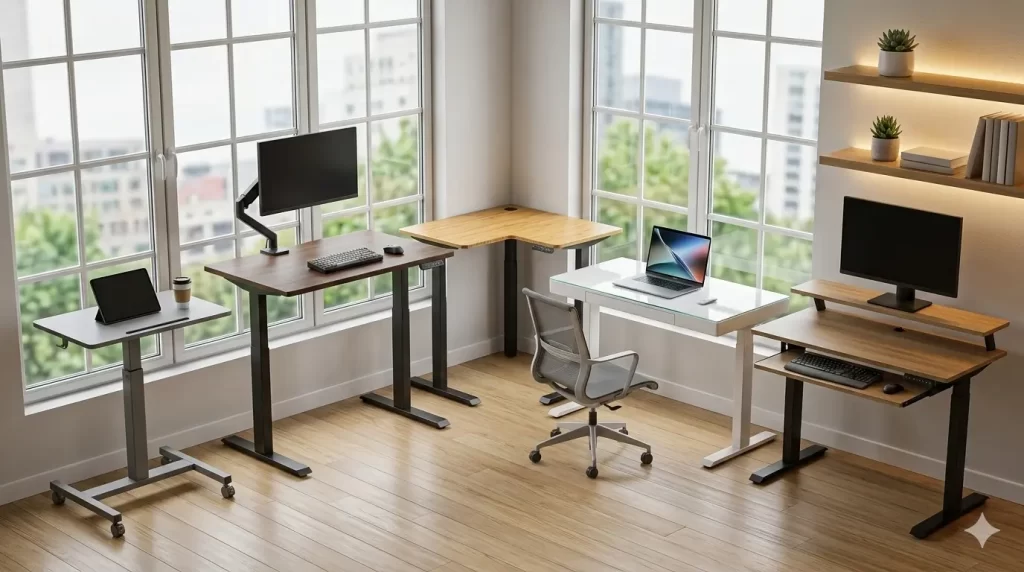
  • Small Space, Big Impact: The Best Standing Desks for Compact Offices (2026)

    Small Space, Big Impact: The Best Standing Desks for Compact Offices (2026)

    One of the biggest misconceptions about building a Smart Home Office Setup is that you need a dedicated room to make it work. In 2026, as urban living and remote work converge, furniture design has pivoted toward “compact high-performance.”

    A standard standing desk is usually 55 to 60 inches wide—far too large for a bedroom corner or a studio apartment. However, a new generation of narrow-profile and minimalist-frame desks allows you to alternate between sitting and standing in as little as 36 inches of horizontal space.

    Best standing desks for small spaces 2026

    At Pick Out Right, we’ve tested the top-rated small-footprint desks to find the ones that offer stability, style, and advanced motorized features without taking over your home.


    The Small Space Selection Guide

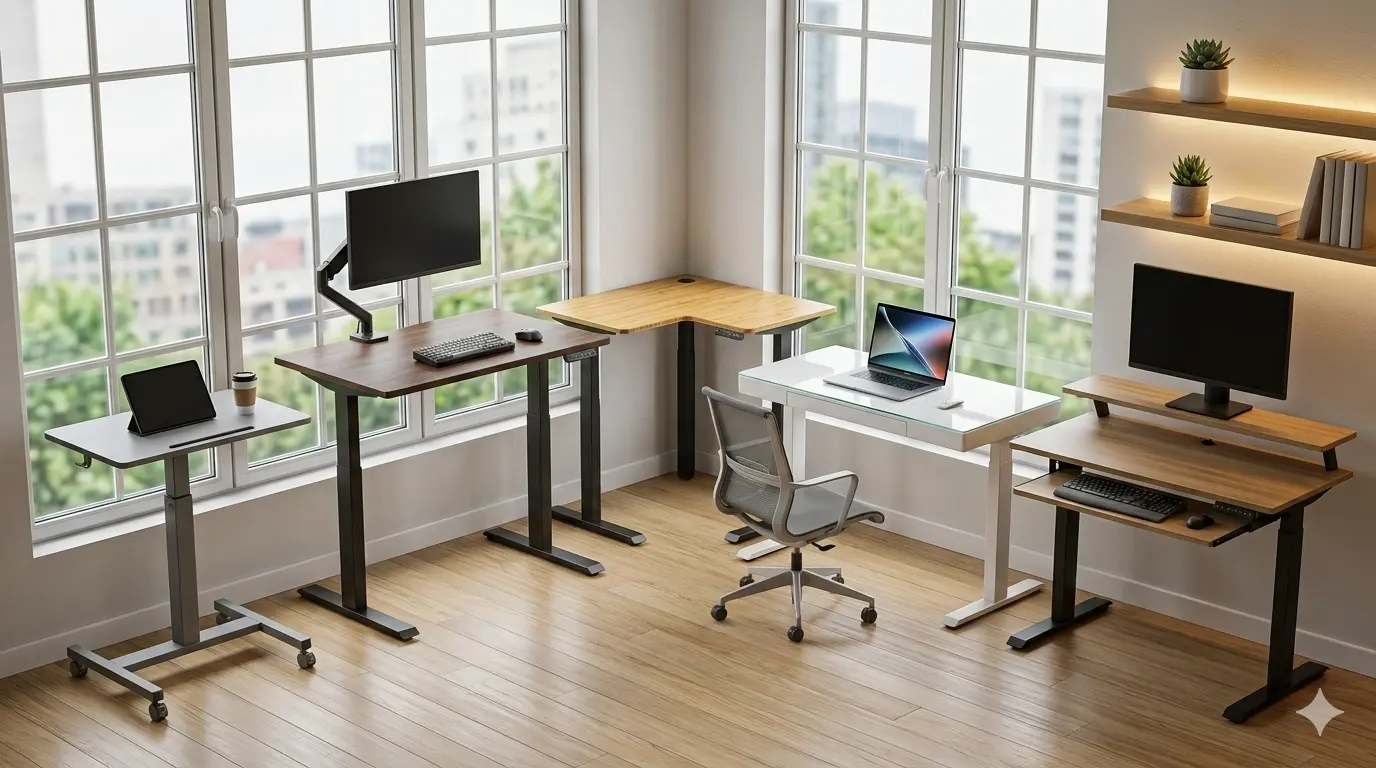
    Desk ModelWidthBest For…
    The Ultra-Compact Electric Hub32″ – 36″Tight Corners & Bedrooms
    The Slim-Profile Glass Top Desk40″Modern Aesthetics & Storage
    The Portable Mobile Standing Podium28″Total Mobility & Laptop Users
    The Dual-Tier Space Saver42″Ergonomic Monitor Height

    1. Best for Tight Corners: The Ultra-Compact Electric Hub

    When every inch counts, this 32-inch wide desk is the gold standard. It provides just enough room for a laptop, a notebook, and a coffee mug, making it ideal for those working out of a bedroom or a hallway nook.

    Why it stands out:

    Despite its small size, it doesn’t compromise on power. It features a heavy-duty single motor capable of lifting up to 150 lbs, ensuring your expensive monitors remain stable during height transitions.


    2. Best for Style & Storage: The Slim-Profile Glass Top Desk

    If your desk is in your living room, you want it to look like a piece of high-end decor. This 40-inch model features a tempered glass top and a hidden drawer for a clean, minimalist look.

    Why it stands out:

    The glass surface doubles as a dry-erase board for quick notes, and the built-in USB charging ports on the side of the frame reduce the need for bulky power strips on top of the desk.


    3. Best for Laptop Users: The Portable Mobile Standing Podium

    Not everyone needs a permanent station. If you prefer to move from the living room to the balcony, a mobile pneumatic desk is your best friend.

    Why it stands out:

    It uses a gas-spring mechanism (no wires required!) to adjust height instantly. With locking casters, you can wheel your workstation into a closet when the workday is over.


    4. Best for Ergonomics: The Dual-Tier Space Saver

    For those who want to maximize vertical space rather than horizontal, a dual-tier desk provides two levels: one for your keyboard and one for your monitors.

    Why it stands out:

    By raising the monitor shelf separately, this desk ensures your screens are at the perfect eye level (preventing “Tech Neck”) without requiring a wide desk surface.


    3 Tips for Organizing a Small Standing Desk

    1. Use a Monitor Arm: Don’t let a monitor stand eat up 20% of your desk. A gas-spring arm (like we mentioned in our Smart Home Office) clears the surface for your keyboard and mouse.
    2. Go Vertical with Storage: Use under-desk CPU mounts or headphone hooks to keep the “clutter” off the main desktop.
    3. Choose a “Small-Footprint” Chair: Pair these desks with a Compact Ergonomic Task Chair that can tuck completely under the desk when not in use.

    Final Thoughts: Size Doesn’t Limit Success

    A small workspace doesn’t have to mean a small career. By choosing a standing desk designed for efficiency, you protect your health and boost your energy levels without crowding your living space.

    Next Steps for Your Setup:

    • Check out our guide on the Best Noise-Canceling Earbuds to block out household distractions.
    • Learn how to optimize your Work From Home SaaS Stack to stay productive anywhere.

    Affiliate Disclosure

    Pick Out Right provides independent reviews. When you buy through our links, we may earn an affiliate commission at no extra cost to you. This supports our research into the best gear for your home.

  • 5 Best Ergonomic Office Chairs for Back Pain: 2026 Reviews & Guide

    5 Best Ergonomic Office Chairs for Back Pain: 2026 Reviews & Guide

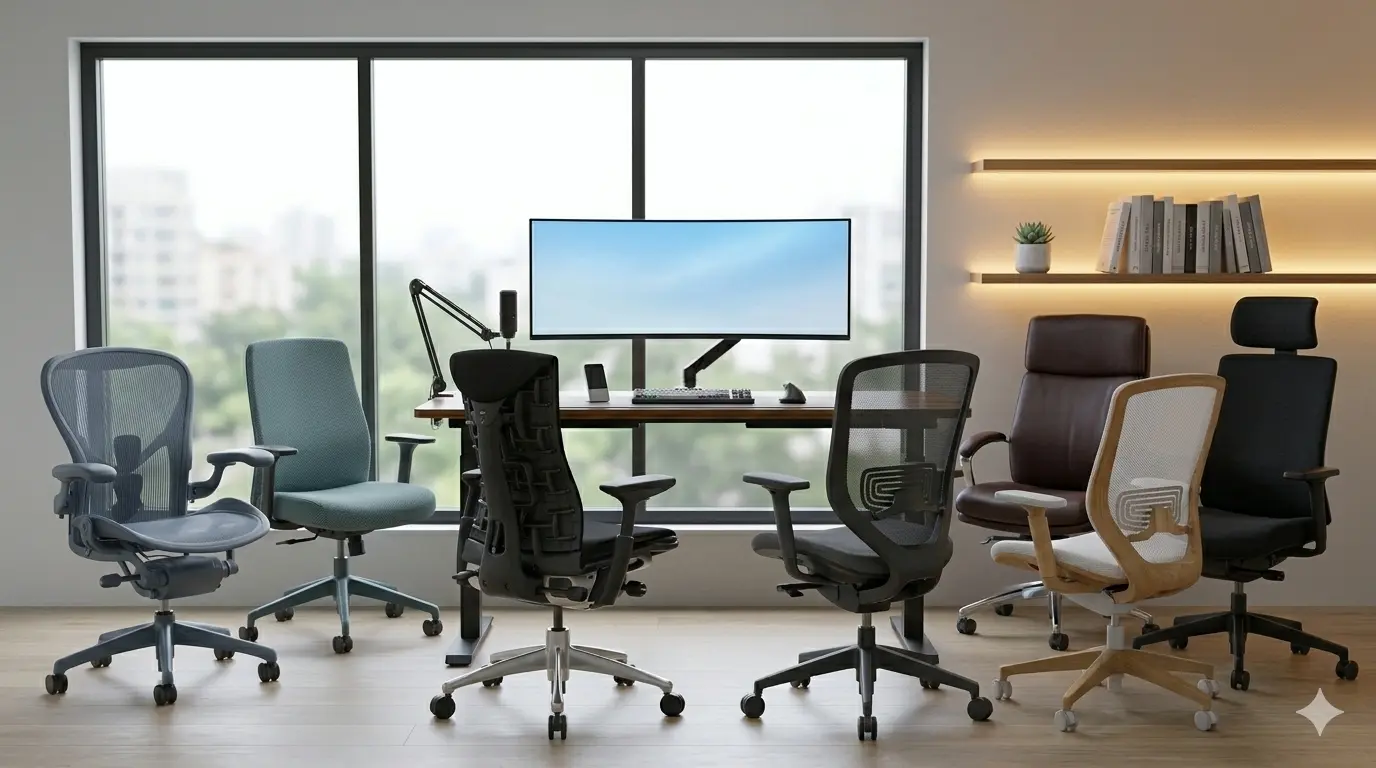
    If you spend more than six hours a day at your desk, your chair is the most important piece of technology you own. It isn’t just “furniture”—it’s a medical intervention for your spine. A poor chair leads to compressed discs, neck strain, and a significant drop in focus.

    In 2026, ergonomic technology has advanced beyond simple height adjustments. We now see dynamic lumbar tracking, elastomer mesh, and weight-sensitive tilt mechanisms that adapt to your body in real-time.

    Best ergonomic office chairs for back pain 2026

    At Pick Out Right, we’ve filtered through the marketing hype to find the seven chairs that actually deliver on their promises of comfort and health.


    The Top Picks at a Glance

    Best For…Recommended StyleKey Strength
    Overall ComfortBreathable Mesh Task Chair with Auto-LumbarAdaptive Support
    Elite Back PainPosture-Correcting Chair with Spine-Mimicking BackSpinal Alignment
    High-End MeshIconic High-Tension Mesh Executive ChairAirflow & Durability
    Budget ValueErgonomic High-Back Chair with HeadrestFeature-Rich / Affordable
    Compact SpacesSleek Mid-Back Designer Office ChairStyle & Size

    1. Best Overall: Breathable Mesh Task Chair with Auto-Lumbar

    This chair is the “goldilocks” of the 2026 market. It balances high-end features with a mid-range price point, making it the perfect centerpiece for any Smart Home Office Setup.

    Why it stands out: It features a “live” lumbar system that moves with you as you lean forward or recline. Unlike manual knobs that you set once and forget, this system provides constant pressure to the L1-L5 vertebrae regardless of your posture.

    • Materials: Triple-layered reinforced mesh that won’t sag after years of use.
    • Adjustability: 4D armrests that move in four directions to support your wrists during typing.
    • Best For: Users who want “set it and forget it” ergonomics.

    2. Best for Chronic Back Pain: Posture-Correcting Chair with Spine-Mimicking Back

    If you have pre-existing lower back issues or sciatica, this is the investment your body needs. The backrest is constructed from dozens of individual “pixels” that mimic the human rib cage and spine.

    Why it stands out:

    It has the highest degree of “dynamic surface pressure” in the industry. It distributes your weight evenly, so you never feel “hot spots” on your sit-bones or lower back.

    • Unique Feature: A narrow backrest design that allows your arms to move freely, encouraging “active sitting.”
    • Warranty: Often comes with a 12-year industry-leading guarantee.
    • Best For: 10+ hour workdays and those with spinal sensitivity.

    3. The Iconic Professional Choice: Iconic High-Tension Mesh Executive Chair

    This is the chair seen in high-end boardrooms and tech startups globally. It pioneered the “all-mesh” design and remains the king of breathability in 2026.

    Why it stands out:

    The patented suspension material eliminates pressure points by suspending the user in a high-tension weave. It’s available in three distinct sizes (A, B, and C) to ensure the frame never pinches your thighs.

    • Pro Tip: Look for the “Remastered” version which includes the updated “PostureFit SL” lumbar support.
    • Best For: Warm climates and users who prefer a firm, supportive feel over soft cushions.

    4. Best Budget Value: Ergonomic High-Back Chair with Headrest

    You don’t need to spend four figures to save your back. This 2026 model provides features usually reserved for premium brands at a fraction of the cost.

    Why it stands out:

    It includes a fully adjustable headrest and a “waterfall” seat edge. The waterfall design slopes slightly downward at the front, which prevents the chair from cutting off circulation to your legs—a common issue with cheap office chairs.

    • Adjustability: Includes height, tilt-tension, and a dedicated headrest.
    • Best For: Students, freelancers, or anyone building their first professional home office.

    5. Best for Modern Aesthetics: Sleek Mid-Back Designer Office Chair

    If your home office is in your living room or bedroom, you might want something that looks less like “corporate gear” and more like high-end furniture.

    Why it stands out:

    This chair uses a 3D-knit fabric that feels like a premium sneaker. It provides a soft, “hug-like” support while maintaining a slim, minimalist profile.

    • Style: Available in multiple muted colors like Sage, Slate, and Cream.
    • Best For: Minimalist setups and design-conscious remote workers.

    Key Features to Look for in 2026

    When shopping for an ergonomic chair, don’t be fooled by “gaming” aesthetics. Focus on these three non-negotiables:

    1. Seat Depth Adjustment

    Your seat should slide forward and back. There should be a 2-3 finger gap between the edge of the seat and the back of your knees to maintain proper blood flow.

    2. Synchro-Tilt

    A chair where the backrest and seat move in a 2:1 ratio. This allows you to recline without your feet lifting off the ground, keeping your spine in a neutral position.

    3. Breathability

    Even the most comfortable foam will eventually trap heat. In 2026, hybrid mesh-and-fabric designs are the gold standard for temperature regulation.


    Summary Recommendation

    Selecting the right chair is the first step in a larger Smart Home Office Setup. Once you have your seating sorted, consider adding an Electric Standing Desk to keep your body moving throughout the day.


    Affiliate Disclosure

    Pick Out Right is supported by its audience. When you purchase through links on our site, we may earn an affiliate commission. We only recommend products we believe provide genuine value to our readers.

  • The Ultimate Smart Home Office Setup: The 2026 Guide to Peak Productivity

    The Ultimate Smart Home Office Setup: The 2026 Guide to Peak Productivity

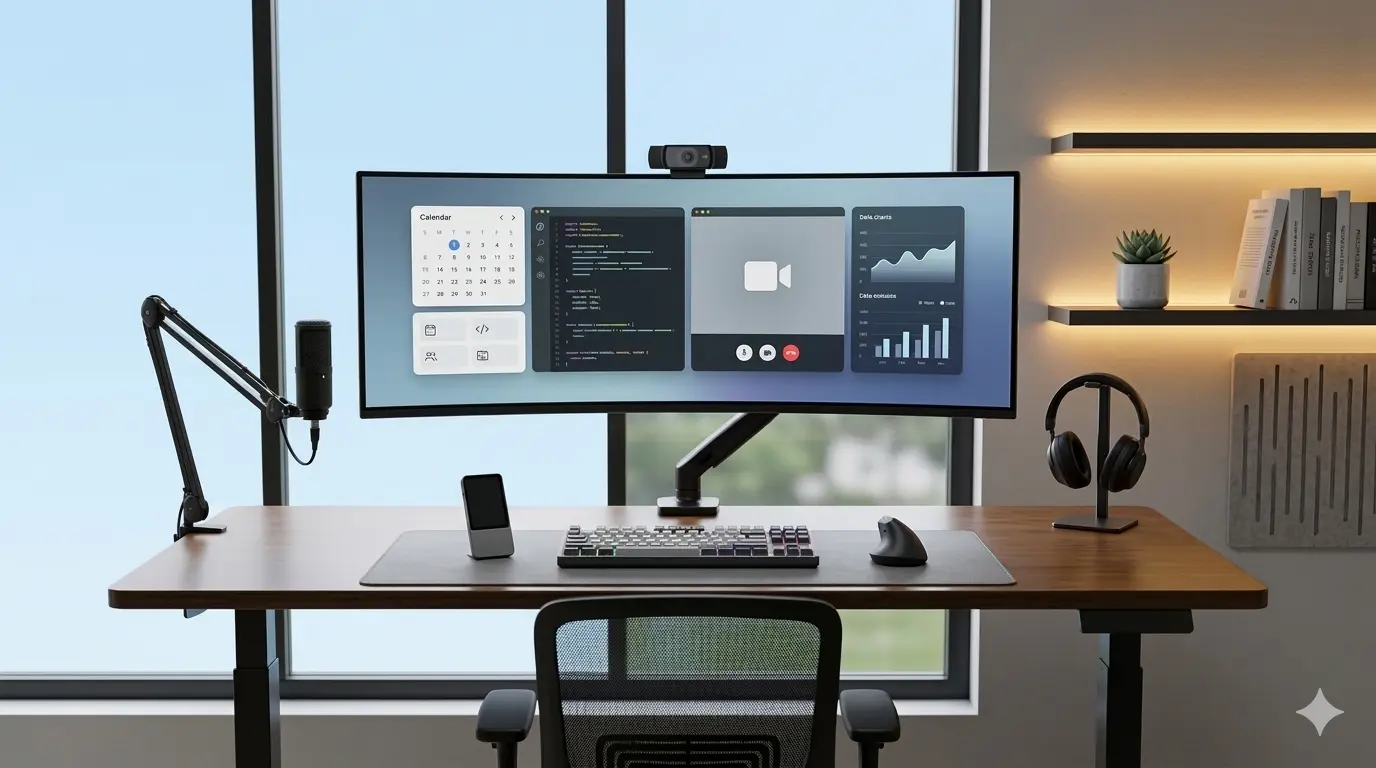
    The definition of a “home office” has shifted. In 2026, it is no longer just a corner with a laptop and a chair; it is a high-performance ecosystem designed to protect your physical health while maximizing your digital output. Whether you are a creative professional, a software engineer, or a remote executive, the environment you inhabit directly dictates the quality of your work.

    At Pick Out Right, we’ve analyzed the latest shifts in workspace ergonomics and smart technology to bring you this definitive pillar guide. Below, we break down the core components of a world-class setup, from the “Big Three” of ergonomics to the AI-driven gadgets that save you hours of administrative friction every week.


    1. The Ergonomic Foundation: The “Big Three”

    Before adding a single smart gadget, you must master the physical foundation. Ergonomics in 2026 focuses on “active sitting” and “neutral posture.”

    The Precision Standing Desk

    A motorized standing desk is the heartbeat of a modern office. Research consistently shows that alternating between sitting and standing every 45 minutes improves circulation and cognitive function.

    The Dynamic Ergonomic Chair

    Your chair should not just be a seat; it should be a tool that moves with you. The trend for 2026 is “elastomer mesh” which provides cooling and targeted lumbar support that adjusts automatically as you recline.

    The Monitor Arm & Eye-Level Alignment

    The most common cause of “tech neck” is a monitor placed too low. A gas-spring monitor arm allows for “floating” your screen exactly 20 inches from your eyes, with the top of the screen at or slightly below eye level.


    2. Visual & Audio Mastery: The Professional Digital Presence

    In a remote-first world, your digital image is your professional handshake. Low-quality video and muffled audio are the 2026 equivalents of a wrinkled suit.

    AI-Powered Visuals

    Modern webcams now utilize 1/1.3″ sensors—similar to high-end smartphones—to ensure you look crisp even in dim home lighting.

    Studio-Quality Audio (Noise-Cancellation is Mandatory)

    The hum of an air conditioner or a neighbor’s lawnmower shouldn’t interrupt your sales call. Digital Signal Processing (DSP) and beamforming microphones are now standard for high-level setups.


    3. Productivity Tech & AI Integration

    The smartest offices in 2026 use hardware to automate software tasks.

    The AI Notetaking Assistant

    Stop frantically typing during meetings. Modern voice-to-text hardware can now record, transcribe, and summarize action items with 99% accuracy.

    The Secondary Display: Ultrawide vs. Dual

    The “Alt-Tab” tax is real. Switching between tabs kills focus. A 34-inch ultrawide monitor provides the screen real estate of two monitors without the distracting bezel in the middle.


    4. The “Clean Desk” Ecosystem: Cable Management

    A cluttered desk leads to a cluttered mind. In 2026, “invisible” cable management is the hallmark of a pro setup.

    • Under-Desk Trays: Use a wide steel tray to house your power strips and excess cords.
    • Magnetic Cable Clips: Keep your charging cables from sliding off the desk when disconnected.
    • The Desk Mat: A large felt or vegan leather mat defines the workspace and improves mouse tracking.
    • Recommended Choice: Large Vegan Leather Desk Protector Mat – Water-resistant and adds a premium feel to any surface.

    Summary Checklist for Your 2026 Setup

    CategoryMust-Have FeatureWhy It Matters
    DeskDual-Motor ElectricSmooth, quiet transitions keep you moving.
    Chair4D ArmrestsReduces shoulder and neck strain during long days.
    Monitor4K or UltrawideIncreases “visual real estate” for multitasking.
    AudioBeamforming MicEnsures you sound professional on every call.
    AI GearTranscription ToolReclaims time spent on manual notetaking.

    Final Thoughts: Build for the Person, Not the Tech

    Your office should be a reflection of your workflow. While it’s tempting to buy every gadget available, the best home office setup is one that removes friction. Start with a high-quality chair and desk, then layer in the technology that solves your specific bottlenecks—whether that’s bad lighting, noisy environments, or meeting fatigue.

    By investing in these key pillars, you aren’t just buying furniture; you are investing in your long-term health and your career’s bottom line.

    Ready to upgrade? Check out our detailed reviews of the Best Quiet Mechanical Keyboards or explore our guide to the Top 10 Productivity Apps for 2026.


    Affiliate Link Note

    Links in this guide lead to highly-rated, expert-tested products. As an affiliate, we may earn a commission from qualifying purchases at no additional cost to you, which helps us continue to provide deep-dive research like this.

  • Best USB Audio Interface: Level Up Your Sound Game in 2024

    Best USB Audio Interface: Level Up Your Sound Game in 2024

    Audio Interface

    Tired of your audio sounding like it’s coming from a tin can? Whether you’re a budding musician, a podcasting pro, or a streamer wanting studio-quality sound, a USB audio interface is the magic wand your setup needs. These little gadgets take your audio from “meh” to mind-blowing by letting you hook up mics, instruments, and more to your computer—no fancy gear required. Ready to dive in? Let’s find the best fit for your sound goals!

    What Is a USB Audio Interface?

    A USB audio interface is a device that improves the sound quality of your recordings and playback by connecting microphones, instruments, and other audio equipment to your computer. It acts as the bridge between your audio gear and your digital workstation, delivering clear, professional-quality sound.

    Why Should You Care About a USB Audio Interface?

    Alright, let’s get real. If you’re a musician, podcaster, or streamer, you’ve probably wondered why your audio sounds more “meh” than “wow.” A USB audio interface can completely transform your sound game. No more muffled recordings or tinny playback—just crisp, studio-like clarity. And the best part? It’s super easy to use.

    But here’s the thing: not all interfaces are created equal. Some are budget-friendly and get the job done, while others come loaded with fancy features that make them worth every penny. Let’s dive into the details and figure out which one is right for you.

    Top Picks for USB Audio Interfaces

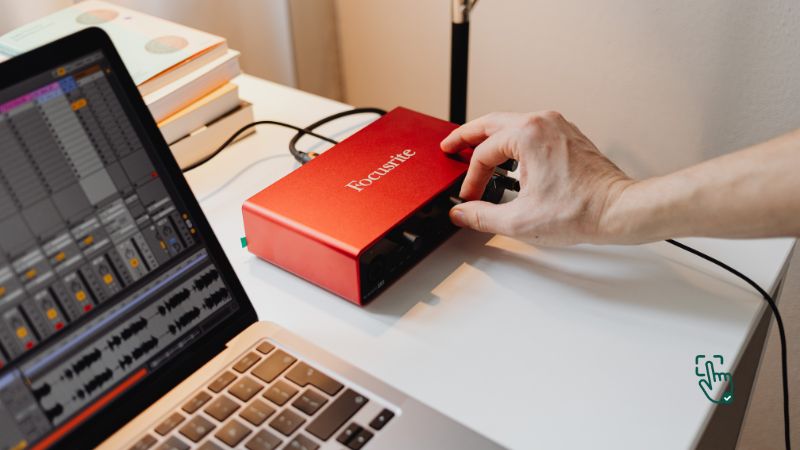
    1. Focusrite Scarlett 2i2 (3rd Gen) – The Gold Standard for Home Studios

    If you’ve ever looked into audio interfaces, you’ve probably heard of the Focusrite Scarlett 2i2 (3rd Gen). And for a good reason—it’s one of the best-selling interfaces out there, known for its reliability, sound quality, and ease of use. This little red box is a favorite among singer-songwriters, guitarists, and podcasters.

    With two high-quality preamps, it delivers crystal-clear audio with minimal noise. Plus, it has an “Air” mode that gives recordings a more open and natural sound—great if you want that professional touch. The latency is super low, meaning you won’t hear any annoying delays while recording. It also comes with a solid software bundle, including Ableton Live Lite, Pro Tools First, and some Focusrite plugins to get you started.

    Now, let’s talk about the downside. If you’re planning a more complex setup—say, multiple microphones or an external mixer—you might find the 2i2’s two-input limitation a bit restrictive. Also, while it’s fantastic for home studios, it’s not exactly a high-end pro interface. But for most people, it’s an absolute steal.

    Related Products:

    2. PreSonus AudioBox USB 96 – Budget-Friendly & Beginner Approved

    If you’re just dipping your toes into recording and don’t want to drop a lot of cash, the PreSonus AudioBox USB 96 is a solid pick. It’s affordable, simple to use, and built like a tank—seriously, this thing is tough. Unlike some other budget interfaces, it records in 24-bit/96kHz resolution, which means you get clear, high-quality sound without spending a fortune.

    It has two combo inputs (mic or instrument), making it ideal for solo musicians or small setups. And the best part? It comes with Studio One Artist, PreSonus’ own DAW, which is an awesome bonus if you don’t already have recording software.

    However, if you’re aiming for top-tier, professional recordings, you might outgrow this one pretty quickly. The preamps are decent but not mind-blowing, and the interface itself is fairly basic—no fancy extras like onboard effects or ultra-low latency performance. But for beginners or those on a budget, it’s an excellent entry point.

    Related Products:

    3. Universal Audio Apollo Twin X – The Premium Choice for Serious Musicians

    Now, if money isn’t an issue and you want the best of the best, let’s talk about the Universal Audio Apollo Twin X. This is the kind of gear you find in pro studios, and for good reason—it delivers incredible sound quality, near-zero latency, and access to Universal Audio’s legendary plugins.

    One of the standout features is its Unison preamps, which let you emulate high-end analog gear for a rich, vintage sound. It also has built-in DSP (Digital Signal Processing), so you can run UAD plugins without overloading your computer. Whether you’re recording vocals, guitars, or even full band arrangements, the Apollo Twin X makes everything sound phenomenal.

    That being said, it’s not cheap. This interface is definitely aimed at professionals or those who are really serious about music production. It also requires a Thunderbolt connection, so make sure your computer is compatible before making the splurge.

    Related Products:

    4. Behringer UMC22 – The Ultimate Budget-Friendly Pick

    If you just need something that works and costs next to nothing, the Behringer UMC22 is a no-brainer. This little guy is ridiculously cheap compared to most interfaces, making it a great entry-level option for beginners who don’t want to spend too much.

    It has one mic preamp and one instrument input, which is perfect for solo musicians or podcasters. While it’s not going to compete with high-end models in terms of sound quality, it does the job well for basic recordings. The build is solid for the price, and it works with pretty much any DAW without any hassle.

    Now, let’s be real—it’s not a powerhouse. The preamp isn’t as clean as more expensive interfaces, and the latency is noticeable if you’re working on larger projects. But if you just need something simple and affordable, the UMC22 is hard to beat.

    Related Products:

    How to Choose the Best USB Audio Interface

    So, how do you pick the right one? Here are some tips:

    • Inputs and Outputs: Think about how many devices you’ll connect. A simple setup might only need one or two inputs, while larger projects require more.
    • Audio Quality: Check the sample rate and bit depth. Look for at least 24-bit/96kHz for professional sound.
    • Portability: If you’re always on the go, choose a compact and lightweight model.
    • Budget: There’s a USB audio interface for every price range. Decide what features you need and stick to your budget.

    Why You Need a USB Audio Interface

    Still on the fence? Let’s break it down:

    • Better Sound Quality: Say goodbye to your computer’s built-in sound card—it’s just not good enough for serious audio work.
    • Low Latency: No more annoying delays while recording.
    • Versatility: Record vocals, instruments, podcasts—you name it.

    Honest Opinions: The Good, the Bad, and the Meh

    USB audio interfaces are fantastic, but they’re not perfect. Here’s what you need to know:

    • Pros:
      • Enhanced sound quality for both recording and playback.
      • Easy to set up and use.
      • Wide range of options for every budget.
    • Cons:
      • Some models can be pricey.
      • Not all interfaces are beginner-friendly.
      • May require additional software or plugins for advanced features.

    Related Reads on Pick Out Right

    If you’re diving into audio gear, don’t miss these helpful guides on Best Microphones for Beginners and Top Studio Headphones.

    Conclusion

    A USB audio interface is the ultimate game-changer for anyone serious about audio quality. Whether you’re recording your next hit song, hosting a podcast, or streaming to your fans, the right interface can elevate your sound to professional levels. From budget-friendly options to high-end models, there’s a perfect fit for every skill level and need. So, take the plunge, invest in your sound, and let your creativity shine—you’ll never look back!

    Love this? Share it with your friends!

  • What’s the Best Office Chair for 2024? Here’s Why You Need the Right One!

    What’s the Best Office Chair for 2024? Here’s Why You Need the Right One!

    Best Office chair in a modern workspace, Herman Miller Aeron, Steelcase Series 1, Secretlab TITAN Evo @ pickoutright.com

    Ever feel like your back’s on strike after sitting all day? Yeah, same here. The best office chair can totally change that. A good chair isn’t just about comfort; it’s about supporting your body while you’re hustling, gaming, or binge-watching Netflix (no judgment). But with a million options out there, how do you pick the one that’s perfect for you? Let’s break it down so you don’t get stuck with a chair that feels like sitting on bricks.

    What Exactly Makes an Office Chair “The Best”?

    Not all office chairs are created equal. A quality office chair is more than just a place to park your rear—it supports your posture, helps reduce back pain, and keeps you comfy for long stretches. Whether you’re working from home or in the office, a good chair can make or break your productivity.

    Why Investing in a Great Office Chair Matters

    Your health. Your comfort. Your productivity.

    That’s the trifecta of benefits you get from the right office chair. Sitting in a poorly designed chair can lead to slouching, back pain, and even long-term health issues. But a chair with the right ergonomic support keeps you feeling fresh, focused, and (bonus!) pain-free. Plus, let’s be real: you spend a LOT of time sitting, so why not make it worth your while?

    Best Office Chairs to Buy in 2024

    1. Herman Miller Aeron Chair
      • Pros: Iconic design, exceptional lumbar support, adjustable armrests.
      • Cons: Pricey, but you’re paying for high-end quality.

    The Herman Miller Aeron is like the Ferrari of office chairs. It’s got a cult following, and for good reason. This chair is built to last and designed with ergonomics in mind. The mesh back keeps you cool during long work sessions, and the lumbar support adjusts to your needs. But hey, it’s not cheap. You might need to save up or wait for a sale to grab one.

    1. Steelcase Series 1 Office Chair
      • Pros: Affordable, highly adjustable, durable.
      • Cons: Basic aesthetic, not as cushy as some competitors.

    If you’re looking for a balance between performance and price, the Steelcase Series 1 is a strong contender. It’s got plenty of adjustable features, so you can tweak it until it fits like a glove. While it doesn’t have the luxe look of higher-end chairs, it gets the job done, especially if you’re on a budget.

    1. Secretlab TITAN Evo 2024 Series
      • Pros: Sleek design, excellent for gamers, and great lumbar support.
      • Cons: Heavy and takes up a lot of space.

    The Secretlab TITAN Evo is technically a gaming chair, but its ergonomic features make it a great choice for office work too. With adjustable armrests, recline function, and a cushioned seat, you’ll feel comfortable whether you’re working or gaming. However, it’s big and heavy, so make sure you’ve got the space.

    How to Choose the Best Office Chair for You

    When picking an office chair, it’s crucial to keep these factors in mind:

    1. Ergonomics
      • Your chair should support your posture, with adjustable lumbar support, armrests, and tilt functions. This ensures you can sit comfortably for hours without feeling stiff or sore.
    2. Material
      • Mesh chairs like the Herman Miller Aeron are great for keeping cool, while leather or fabric chairs provide a more cushioned feel. Which one’s better? It depends on your preference.
    3. Adjustability
      • Everyone’s body is different, so having adjustable height, armrests, and seat depth is a game changer. Look for chairs that let you make these tweaks to fit your body perfectly.
    4. Durability
      • A chair is an investment. If you’re spending a lot of time sitting, don’t skimp on quality. Brands like Herman Miller and Steelcase offer durable chairs designed to last for years.

    Where to Buy the Best Office Chairs

    You can find these office chairs at popular retailers like Amazon, Wayfair, or directly from the manufacturers’ websites. Keep an eye out for sales during Black Friday, Cyber Monday, or other seasonal deals. If you’re looking for a more budget-friendly option, stores like IKEA and Walmart have decent chairs, though they might not have the same long-term durability.

    When Should You Upgrade to a New Office Chair?

    If you’re dealing with constant backaches, stiffness, or discomfort after sitting for a while, it’s probably time for a new office chair. Chairs wear down over time, and even the best models might need to be replaced after 7-10 years of heavy use.

    The Downside of Some Office Chairs: Honest Thoughts

    As much as we’d love to say that every office chair is awesome, the truth is, some can be a bit of a letdown. Here’s where they fall short:

    • Expensive Price Tags: High-quality chairs like the Herman Miller Aeron can cost a small fortune. Sure, they last for years, but not everyone can justify spending over $1,000 on a chair.
    • Bulk & Weight: Some ergonomic chairs, especially gaming ones like the Secretlab TITAN Evo, are huge and take up a lot of space. If you’ve got a small office, this could be a dealbreaker.
    • Not Always Easy to Assemble: Depending on the chair, assembly can be tricky. If you’re not handy with tools, you might need a second pair of hands to help you put everything together.

    Conclusion

    Which Office Chair Should You Choose?

    Ultimately, the best office chair for you depends on your needs and budget. If you’re willing to invest in long-term comfort, the Herman Miller Aeron is top-tier. For a solid mid-range option, the Steelcase Series 1 offers great value. And if you want something that doubles as a gaming chair, the Secretlab TITAN Evo will keep you comfy and looking cool.

  • What’s the Best Laser Printer? Here’s Why You Need One and How to Choose the Best for Your Needs

    What’s the Best Laser Printer? Here’s Why You Need One and How to Choose the Best for Your Needs

    Best Laser printers from HP, Brother, Canon, and Lexmark in various office settings @ pickoutright.com

    Tired of slow, ink-guzzling printers that constantly break down? It’s time to make the switch to a laser printer! Known for their speed, reliability, and cost efficiency, laser printers are the ultimate solution for anyone who needs high-quality prints without the hassle. Whether you’re printing documents at home, managing office tasks, or running a small business, a laser printer can easily handle everything from simple text to more complex graphics. But with so many options on the market, it can be overwhelming to pick the right one. Don’t worry—we’ve got you covered. Let’s break down the top laser printers of 2025 and find the perfect match for your needs.

    Why Should You Choose a Laser Printer?

    Speed, durability, and lower long-term costs.

    If you’re tired of dealing with the slow speeds and constant ink cartridge replacements that come with inkjet printers, a laser printer might be the upgrade you need. Laser printers use toner cartridges that last much longer and print faster, making them ideal for high-volume tasks. Plus, they tend to offer sharper text, which is great for professional documents.

    Best Laser Printers of 2025

    1. HP Color LaserJet Pro MFP M479fdw

    Alright, if you’re after a do-it-all beast of a printer that doesn’t slow down or mess around, the HP Color LaserJet Pro MFP M479fdw might just be your new best friend. This thing is basically the Swiss Army knife of laser printers—it prints, scans, copies, and faxes. Everything you could need, all packed into one solid machine. It’s super quick too, pumping out pages without making you wait forever. Whether you’re running a small business or just want something heavy-duty for your home office, this printer can handle it.

    One of the coolest things about it? The security features. You won’t have to stress about random print jobs popping up from who-knows-where. It’s got password protection and other smart settings to keep everything locked down. Plus, the print quality—especially in color—is seriously sharp. Presentations, marketing materials, even family photos look crisp and clean.

    That said, it ain’t tiny. It’s got some bulk to it, so if your desk is already crowded, you might need to clear some space. Also, it’s not the cheapest printer out there—but you’re definitely getting a powerhouse for what you pay.

    Pros: Fast printing, solid color quality, all-in-one features, great security.
    Cons: Pretty bulky, costs more upfront.

    Related Products: HP LaserJet M234sdw, Brother MFC-L3770CDW, Canon Color imageCLASS MF656Cdw

    2. Brother HL-L2350DW

    Okay, let’s say you don’t need anything too flashy. Maybe you just want something that prints plain ol’ black-and-white documents without any drama. Enter the Brother HL-L2350DW. It’s affordable, super simple to use, and takes up barely any space. Perfect for students, home offices, or anyone just trying to keep it lowkey.

    This little guy prints fast—like, 32 pages per minute fast. And it does it quietly, which is always a bonus. Setup is easy too. It connects wirelessly, so no need to mess with a bunch of cables. Just hook it up to your Wi-Fi and you’re golden. It’s got auto-duplex printing as well, which means it can print on both sides of the paper without you flipping anything manually. That’s a paper-saver for sure.

    Now, it’s not an all-in-one. No scanning, no copying, no color. It’s strictly print-only, black-and-white. But for what it does, it does it really well.

    Pros: Compact, reliable, fast black-and-white printing, budget-friendly.
    Cons: No color printing, no scanning or copying features.

    Related Products: Brother HL-L2395DW, Canon imageCLASS LBP6230dw, HP LaserJet MFP M114w

    3. Canon imageCLASS MF743Cdw

    Now, if you’re all about that high-quality color printing life, the Canon imageCLASS MF743Cdw is where it’s at. This thing was made for vibrant prints—like those brochures, flyers, or reports that need to pop. It’s a full-on workhorse, built with businesses in mind, but still totally usable in a serious home setup.

    Speed? Yup, it’s quick. Duplex printing? Got it. Touchscreen interface? Oh yeah. And the interface makes navigation super easy—even if you’re not tech-savvy. The print quality is honestly one of the best in this price range, and the build itself feels sturdy enough to last for years.

    But here’s the kicker: the toner cartridges. They’re not cheap. And if you’re printing in color a lot, they’ll run out quicker than you’d like. So, while the initial investment in the printer is worth it, make sure to plan ahead for ongoing costs.

    Pros: Gorgeous color prints, duplex printing, solid build quality, user-friendly.
    Cons: Toner gets pricey, a bit on the heavier side.

    Related Products: Canon MF644Cdw, HP Color LaserJet Pro M255dw, Brother MFC-L8905CDW

    4. Lexmark B2236dw

    Looking for a cheap, compact, black-and-white laser printer that still delivers on speed and quality? The Lexmark B2236dw should definitely be on your radar. It’s one of those printers that just gets straight to the point—print fast, print sharp, and don’t make a fuss.

    You’re not gonna find a bunch of bells and whistles here. No scanning, no fax, and definitely no color. But what it does give you is a reliable and fast printing experience, especially for text-heavy docs. Whether you’re printing essays, invoices, or just your usual work-from-home stuff, this little machine handles it like a champ.

    Setup is super easy too. Wireless printing means you don’t have to deal with messy cords, and it plays nicely with both Windows and Mac systems. Plus, it’s compact enough to fit even in tight spaces. If you’re just after something that works and doesn’t cost a fortune, this is a solid pick.

    Pros: Fast, reliable black-and-white prints, compact design, affordable.
    Cons: No extra features, only prints in black-and-white.

    Related Products: Brother HL-L2325DW, HP LaserJet Pro M118dw, Canon imageCLASS LBP6030w

    How to Choose the Best Laser Printer for You

    Not all laser printers are created equal, and the one that’s right for you depends on what you need it for. Here’s a quick guide to help you decide:

    1. Purpose
      • Are you printing mostly documents or do you need high-quality color images? If you just need black-and-white documents, the Brother HL-L2350DW or Lexmark B2236dw are great options. If color is a priority, look into models like the Canon imageCLASS MF743Cdw.
    2. Speed and Volume
      • If you’re printing in bulk, speed matters. For offices, a fast, multifunction printer like the HP Color LaserJet Pro MFP M479fdw can handle heavy workloads. For more casual home use, something simpler and slower will save you money.
    3. Budget
      • Factor in not just the cost of the printer but also the cost of toner. While laser printers save you money in the long run, some models, like the Canon imageCLASS, have higher toner prices.

    Where to Buy the Best Laser Printers

    The best laser printers can be found online or in tech stores like Best Buy, Amazon, or directly from the brand websites like HP, Brother, and Canon. Keep an eye out for deals, especially around Black Friday or back-to-school season. Some retailers offer extended warranties and service plans, which can be a good idea for more expensive models.

    When Should You Upgrade to a Laser Printer?

    If you’re dealing with high-volume printing, tired of slow inkjet printers, or need professional-quality text and color prints, it might be time to invest in a laser printer. They’re perfect for businesses, home offices, or even students who print a lot of reports and documents.

    The Downsides: What Are the Negative Aspects of Laser Printers?

    Even the best laser printers have a few drawbacks. Here are some things to keep in mind:

    • High Upfront Costs: While they save money over time, laser printers tend to have higher upfront costs compared to inkjets. You’ll need to budget for the initial investment.
    • Toner Prices: Though toner lasts longer than ink, it can be pricey. Brands like Canon tend to have more expensive toner cartridges, so make sure to factor that into your long-term costs.
    • Size: Some laser printers, especially those with multifunction features, can be quite bulky. Make sure you have enough space for it in your home or office.

    Conclusion

    Which Laser Printer Should You Buy?

    Ultimately, the best laser printer for you depends on your needs. If you’re looking for something powerful and versatile, the HP Color LaserJet Pro MFP M479fdw is your best bet. For budget-conscious shoppers, the Brother HL-L2350DW offers great value for everyday black-and-white printing. If high-quality color prints are essential, go for the Canon imageCLASS MF743Cdw.